Organizing with R Projects
I have talked about R projects before, but have not really said what they are. A collection of files but RStudio adds some nice extra features.
Friday, Oct 16, 2020 By Hope Snyder.
While working on your coding masterpieces, you have likely made multiple files and folders holding everything having to do with your project. Every time you open R you need to navigate to your files and also set up your working directory. Projects allow you to avoid these navigation issues, opening everything you need with one click.
New Magic
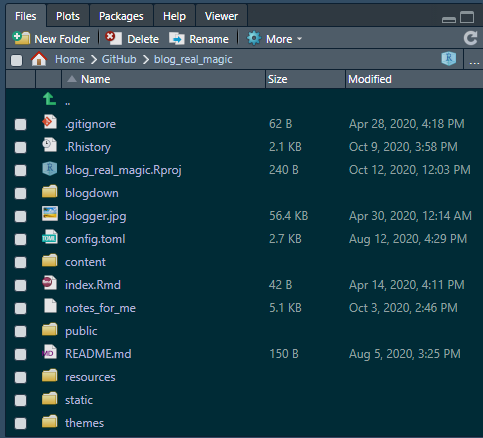
R projects are collections of files. They will mostly be organized in the same way you normally have them. However, in the parent directory (the place where you go to reach everything in the project) there will be an .Rproj file. This will signal to R that it should set that location as the working directory while this project is open. This makes path names easy to set up within your code. Sharing is also easier as you know exactly what needs to be sent to your collaborators.
RStudio has a few more features that will make coding life easier when working with projects. In the top right corner of RStudio, there is a project menu. This menu includes the option to create a new project and for opening another project.

My favorite option is to open another project in a new window. Then I have a different window open for each project. I don’t have files from my blog website open in the same window as my dissertation research. Also, when you reopen a project within RStudio, it remembers what files you had open! You can pick up exactly where you left off!
RStudio also has a File Viewer pane. It defaults to the lower right side. When you open a project, that pane should be open to the parent directory of the project. This provides easy access to all of your project files.
When To Cast This Spell
The obvious answer to this question is when you have a project that has a lot of files. Particularly, you want to create an R project when those files refer to one another for functions or results. Also, projects are wonderful to use if you have multiple things you are working on at once. Then you can have a window open for each project and keep things separated. Task shifting and organization is much easier to do.