Python: A cousin of R
There are so many different coding languages out there. Each has their own pros and cons. Let's take a look at Python.
Friday, Sep 18, 2020 By Hope Snyder.
So first, I have to say that I am primarily an R programmer. I have experimented and gone through the basics of Python. It is not my preferred language (at least right now) so there are probably millions of things that I am missing when it comes to using this language. So read this knowing that it is coming from someone who rarely uses Python, but is curious about its merits.
Python is very similar to R as they both are object-oriented, high-level programming languages. It is a general purpose coding language, so it can be used for multiple things like software and web development, statistics, and system scripting. To bring back the recipe metaphor I used before, it’s like making another batch of cookies but following two different recipes. But they both end up delicious!
First Things First: Installation
To install python, there are a few options that I found when entering into the Python community. According to the Python website, it already comes preinstalled Linux and on some Windows computers. If that is the case though, I would recommend double checking the program version. You may need an update!
If you do need to install it yourself, these are the options I found:
Python website: You can find a sampling of the older versions as well as the newest release here. They have options for all the different operating systems. But you may need to download the text editor for Python separately.
Anaconda: This is a data science distribution platform. The Individual Edition has about a dozen open source coding languages that are included. Because of that, this is what I recommend. Within Anaconda, there are a few choices for using Python. It includes Jupyter notebooks, which is like R markdown, and Spyder, which seems to be like RStudio. Anaconda also includes an instance of RStudio (but it does seem to be a older version so beware)!
Where to Begin
Once you set up the interface in Spyder, you can type in your code into the text editor on the left hand side. At the top of the window, there are a few buttons to push to run your code. The large green play button will run the entire program. The one that has a highlighted line and a play button will run the line you are on. That resulted in a lot of unnecessary errors for me.
Now that you are ready, it’s time to start coding. The way I began to learn how Python worked was to develop a few small programs. Each of these programs took in user input, something I think Python does really well, and produced a result. The programs were never more than 100 lines of code and were some simple, fun games. Things like mad-libs and hangman. The example program below is a random number generator, mirroring rolling dice for a DnD skill check.
# For a die roll, you need some randomization, so you need to call that package.
import random

# Creating a dice object in Python is like creating a small collection of functions.  These functions will only be applied to objects of the class Dice.  Note, Python does take white space into consideration.
class Dice(object):
    def __init__(self, num_of_sides):
        self.size = num_of_sides
    def roll(self):
        possible = range(1, self.size + 1)
        return random.choice(possible)

# The final step is to create a "user interface" that will appear in the console.  Within this interface, you define how to use the user input.
print("Skill Check!")
print("How many sides are on the die you need to roll for this check?")
size = input(": ")

die = Dice(int(size))

print("Do you have a modifier on this skill?")
mod = input(": ")

result = die.roll() + int(mod)

print("The value you rolled was ", result, ".")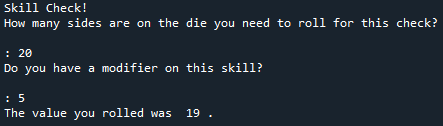
The Great Debate
In learning about Python I discovered the great debate between R and Python. Which is better? Which is more welcoming to new coders? Which should I use for my big project? The short answer is they both have good things about them and they both have drawbacks. Use what works for you and what works best for the project you have in mind. But if you are curious about my opinion:
Python reminded me a lot of coding in Java which was my first coding language. It was nice to see the similarities with how things need to be defined and used. So picking it up as a language seemed easy. Unfortunately though, writing the code was not a simple and straightforward as I expected. It could be because I was expecting Java coding, but I had a tough time figuring out why something wasn’t working and how the solution was how I set up my code. Nothing is more frustrating to me than when code requires white space and a special character at the end of lines of code. Python seems to depend on the white space in your code rather than use parentheses sometimes.
Another great thing about Python was how easy it was to get user input for the program. It’s one function: input(""). I liked that the user did not have to see the background code in order to use the program. I am unaware of how this could be done in R without employing Shiny applications.
A downside came with using packages. There are so many packages (almost 400 with the Anaconda instance), which is great. But I could not track down any documentation about the packages and the functions they gave me access to. For example, in the random package in the example above, the only function I knew it had at the time of writing that program was random.choice() because the example I was following told me so. That is a big drawback for me because it doesn’t seem as welcoming to new Python coders.
This doesn’t mean I’m going to recommend R. While R has wonderful documentation on average that can be accessed within the user interface and is a little more forgiving for new coders, it does have its own set of drawbacks. It has so many packages that quality control poses a challenge. Since the packages are made by community members, they vary in terms of completeness and accuracy. Finally, R can be taxing on your computer memory. It is a bit of a resource hog. It can slow things down the more you ask it to do.
Overall, my opinion in the R vs. Python debate is to sit on the fence. I think a good data scientist should use them in conjunction with each other to use the advantages of both languages. I have a long way to go to discover all of the advantages that Python has to offer, but I am looking forward to continuing down that path.
This has been an extremely basic introduction to Python. If you want a more in depth introduction I would recommend the book Get Programming: Learn to code with Python by Ana Bell. It served as my introduction and it walked me through all of the starting programs/games.