R Basics: Statistical Tests Part 2
Time to do (a little more complicated) statistical tests and inferencing!
Friday, Dec 11, 2020 By Hope Snyder.
Let’s continue our discussion of statistical tests with comparisons for data with three or more groups. For a detailed description of any of the tests and calculations I show here, you should look elsewhere (Wikipedia is a good source!). I will only show you how to do them in R and how to interpret the results.
Again, for these examples, I will use the mtcars data set that is installed along with R. Note, that in order to get access to just a single column or variable in data sets in R you use the $ symbol. For example, to get only the values of the mpg variable from the mtcars data set, use the code mtcars$mpg.
ANOVAs
The most common way to compare three or more group averages is by conducting an Analysis of Variance, or ANOVA. The important thing to know about ANOVAs is that it will compare any number of groups, however it will only tell you that a difference exists SOMEWHERE. It doesn’t tell you which groups are different. Post-hoc (or after-the-fact)tests often follow an ANOVA test to determine where the difference is located.
In my example, I adjusted the data set a little by making one of the variables a factor variable. This will define the groups to use in the ANOVA test.
mtcars$cyl <- as.factor(mtcars$cyl)

anova <- aov(mpg ~ cyl, data = mtcars)

summary(anova)
To get the results of the ANOVA from R, you need to ask for a summary of the ANOVA model. The last two columns of the table that appears hold the test statistic and the p-value for the ANOVA. R is really nice here because it will star the significant results in this table. To interpret this result, you would say something like “There is a difference in the average miles per gallon in cars with different numbers of cylinders in the engine (\(F(2,29)=39.7\),\(p<.001\)).”.
In this example, I have done a one-way ANOVA. The “one” refers to the one factor I used to define my groups. If I had second factor in the data set, I would perform a two-way ANOVA. The code would be similar to above, but you would add the second factor to the ANOVA model statement.
Regression
Regression is a vast area of statistics. I could write an entire blog about regression. However, here I’ll go over the basics of conducting a simple regression in R. Regression is another way to examine the relationship between variables. Using this method, you can see an estimation of how much a change in one variable can effect another.
The variables in regression are often divided into what you are trying to predict (the dependent variable) and what you are using to make the prediction (the independent variables or predictors). It’s important to make this distinction before you start! For our example, let’s predict miles per gallon from horsepower.
fit <- lm(mpg ~ hp, data=mtcars)
summary(fit)
##
## Call:
## lm(formula = mpg ~ hp, data = mtcars)
##
## Residuals:
## Min 1Q Median 3Q Max
## -5.7121 -2.1122 -0.8854 1.5819 8.2360
##
## Coefficients:
## Estimate Std. Error t value Pr(>|t|)
## (Intercept) 30.09886 1.63392 18.421 < 2e-16 ***
## hp -0.06823 0.01012 -6.742 1.79e-07 ***
## ---
## Signif. codes: 0 '***' 0.001 '**' 0.01 '*' 0.05 '.' 0.1 ' ' 1
##
## Residual standard error: 3.863 on 30 degrees of freedom
## Multiple R-squared: 0.6024, Adjusted R-squared: 0.5892
## F-statistic: 45.46 on 1 and 30 DF, p-value: 1.788e-07The first thing you should not is how similar this output is to ANOVA output. When you predictor variable is categorical, or defines a group, regression and ANOVA should be pretty similar. The second thing you should look at is the plot of the regression line.
plot(mtcars$hp, mtcars$mpg)
abline(fit)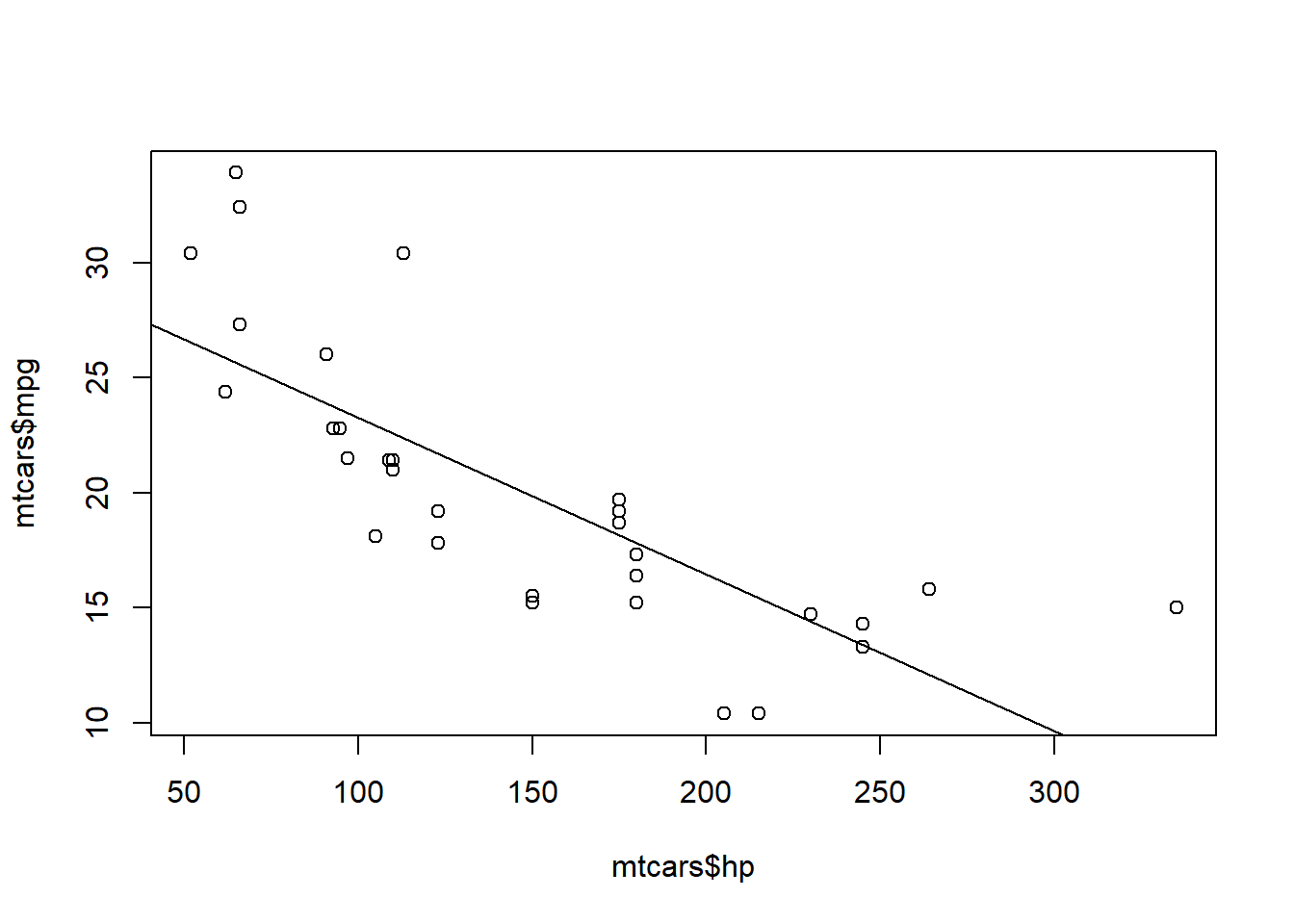
It’s the same plot that we had when we looked at the correlation between these two variables. We have just added the regression line to gain some more insight into the relationship between horsepower and correlation.
Tests of Independence
The last tests I will go over as basics are the Chi-Squared (\(\chi^2\)) test and Fisher’s Exact test. These tests are applied when you are classifying data into multiple groups. Is there a difference between the number of observations who fall into each group?
Since these tests rely on frequencies of observations in a specific category, it is helpful to create a frequency table.
# Number of cylinders in engine
mtcars$cyl <- as.factor(mtcars$cyl)

# Automatic transmission (0 = automatic, 1 = manual)
mtcars$am <- as.factor(mtcars$am)

freq <- table(mtcars$am, mtcars$cyl)
freq
##
## 4 6 8
## 0 3 4 12
## 1 8 3 2A Chi-Squared (\(\chi^2\)) test or Fisher’s Exact test will test if the differences in the amount in each group is significant. The difference between the tests is that, as the name implies, a Fisher’s test is more exact. However, the output from the Fisher’s test in R only includes the p-value, so I would recommend using and reporting the Chi-squared value instead.
chisq.test(freq)## Warning in chisq.test(freq): Chi-squared approximation may be incorrect##
## Pearson's Chi-squared test
##
## data: freq
## X-squared = 8.7407, df = 2, p-value = 0.01265#fisher.test(freq)The output would be interpreted as: “The frequency of cars in each group is different from what was expected (\(\chi^2(2)=8.74\), \(p=.013\)).”
We have gone over basic statistics, plotting, importing data, and some statistical tests (for two groups and more). That concludes my series for R basics for now. I may revisit it again in the future, but let me know if there is something you think I should add!